


Minimal Watch Faces
3.31.76K Reviews
App Specs
- Version
- 2.6.7
- Updated On
- License
- Free
- Downloads
- 5,000,000+
- Developer
- Battery Stats Saver
- Categories
- Personalization
- Platform
- Android, iOS
Screenshots
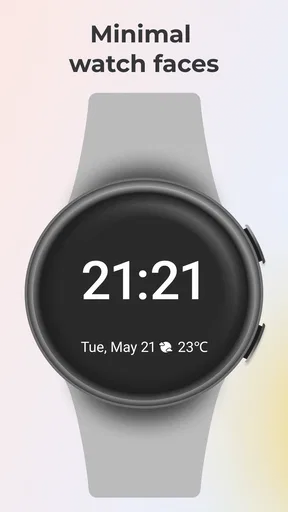
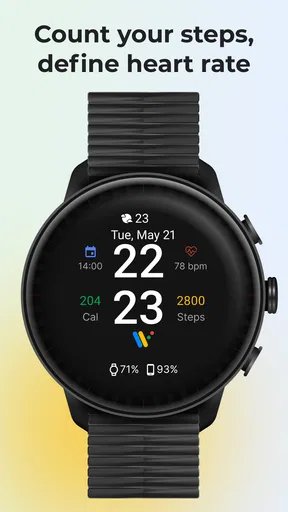
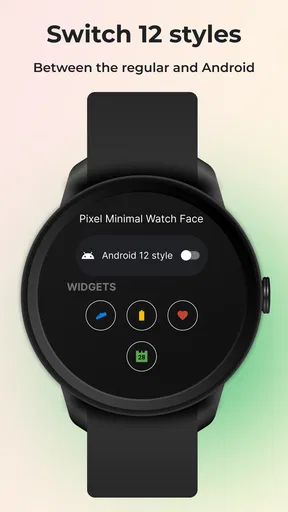
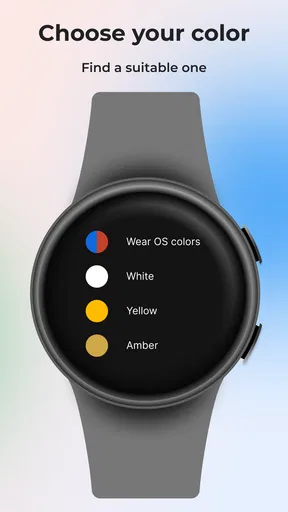
 Analysis by AppCompare
I’m drawn to watch faces that let me check the time without turning my wrist into a tiny dashboard. Minimal Watch Faces is aimed at that preference: it offers a pared-back look for Wear OS watches, with room to make the display feel more personal. I’d consider it when the default options seem too busy, but I’d also keep expectations grounded: a clean appearance is the main appeal, not a promise that every watch task will become simpler.
Who will appreciate a quieter wrist
This personalization app makes the most sense if you care about how your watch looks and want a face that feels less crowded at a glance. It may suit someone who prefers a restrained style at work, or who wants a watch display that doesn’t compete with a phone screen full of alerts. If you rely on seeing several pieces of information immediately, though, a denser face may be more practical than a minimalist one.
A useful way to judge a face is to ask what you need to see while moving, not what looks best in a still preview. If you usually check only the time, a cleaner layout can be a good fit. If you often glance for the date or activity details, make sure the available layout leaves room for the information you actually use. Minimalism works best when it removes visual noise without hiding something important.
Where it sits among watch-face options
Compared with the faces already included with a watch, a dedicated face app gives you another place to browse for a look that better matches your taste. The trade-off is that an extra choice can mean another step in setup and another collection to evaluate. A built-in face is often the simpler pick if you already like its design and want to avoid managing anything beyond the watch’s own settings.
It also differs from highly information-rich faces, which prioritize quick access to multiple details. Those can be better for someone who treats a watch as a compact activity or schedule display. Minimal Watch Faces is more compelling when appearance and quick time checks matter more than packing the screen. I’d choose based on the moments when I actually look at my watch, rather than assuming the most customizable option is automatically the most useful.
Everyday use: make the glance count
Imagine heading into a meeting where you want to check the time discreetly without a bright, crowded screen drawing attention. A restrained face can make that moment feel calmer. Later, on a walk, you might want a different balance of readability and useful details. The practical test is whether switching between those needs feels worthwhile; if you prefer one setup all day, a face that already suits your routine is likely the better choice.
One small but useful habit is to check the display in the lighting where you’ll use it most. A color that looks tasteful indoors may be harder to read outdoors, while a high-contrast choice can be easier to pick out at a glance. I’d prioritize legibility over matching an outfit perfectly, especially if the watch is something I consult while walking or carrying bags.
Worth Reading Before You Choose

EA SPORTS FC Mobile 26 Is a Bigger Football Game, but It Takes Time

Flipboard Shows What News Apps Must Do Beyond the Feed

Switching to Android Auto Means Rethinking Your Driving Routine

Google Calendar Makes a Crowded Week Easier to Manage

Ludo King Makes the Most of the Minutes Between Plans

Baby Panda World Brings Quick Play to Modern Phones, but Its Game Library Feels Busy
What to check before settling on a design
Think about your most frequent glance first, then choose a layout around it. If the time is all you need, extra information can undermine the uncluttered effect. If you use a date or another complication, keep only the details that save you from reaching for your phone. This is a useful trade-off to make deliberately: every addition may help in one situation while making the overall display feel busier.
Customization is most valuable when it solves a real mismatch, such as a color that is difficult to read or a style that doesn’t suit your day-to-day clothes. I wouldn’t spend ages adjusting a face just because more settings exist. Settle on a clear version, wear it through a normal day, and change one element at a time if something is distracting. That makes it easier to tell whether an adjustment genuinely improves the experience.
Current state and product context
Minimal Watch Faces is a free personalization app from Battery Stats Saver, with optional in-app purchases priced from $0.99 to $99.99 per item. It is rated for Everyone, and its current version is 2.6.7. The app has an average rating of 3.3 from around 32,000 ratings, with around 1,800 written reviews and over 5 million installs. Those figures suggest that plenty of people have tried it, while the middling average is a reminder to decide based on your own watch and preferences rather than popularity alone.
The app was released on February 3, 2020, and version 2.6.7 is the clearest current reference point for what a new user will encounter. That release history establishes that it has been available for years, but it does not, by itself, show what changed between versions. I’d treat the current version as the practical starting point and look at the options available on my own device before building a routine around a particular design.
What an update means for existing users
If you already use the app, an updated version number is a reason to check whether the experience on your watch still suits you, not a reason to assume that the face has changed in a particular way. Revisit your chosen design after updating and confirm that its readability and information balance still work for your routine. For a new user, the same approach helps: install, try a simple setup first, and decide whether the available style is worth keeping before investing time in fine adjustments.
That gradual approach also makes troubleshooting less confusing. If a face looks different from what you expected, change one setting at a time and check the result on the watch itself rather than judging only by a preview. A phone display and a watch display are used at different sizes and distances; what seems subtle on one can be hard to read on the other.
Remaining trade-offs and what I’d watch for
The biggest limitation is inherent in the idea: a minimal face can become too minimal if you need several details at once. The customization may help balance appearance and usefulness, but it still asks you to decide what deserves space. There is also a difference between finding a face attractive and finding it comfortable to use all day, so I’d give a new design a normal day’s trial before deciding it is a keeper.
I’d also be cautious about treating battery savings as a guaranteed reason to switch. A simpler visual design may feel lighter, but battery life depends on the watch and its settings, so I would judge that on my own device rather than count on a particular improvement. If battery endurance is your main concern, compare your real charging routine before and after changing the face, and avoid drawing conclusions from a short test.
For readers wondering whether it is worth trying, the low-commitment case is straightforward: it is free to start, and you can decide whether its style fits your watch before considering optional purchases. The better question is whether the designs available to you suit the way you use your screen. If you want a large selection of data at a glance, prefer built-in options, or dislike tweaking appearance, another watch-face route may be a better match.
What I’d keep an eye on as a user is whether future versions make the current experience clearer or more useful on the devices people actually wear. Until then, the sensible choice is to judge version 2.6.7 by its present-day fit on your own watch, not by assumptions about future additions. For someone who wants a cleaner look and is willing to test readability and information needs, Minimal Watch Faces is worth exploring; for someone who values dense information above appearance, I’d look elsewhere.
Ever get tired of your smartwatch looking like a little computer on your wrist? If you’re like me and crave a touch of elegance and simplicity, then Minimal Watch Faces might just be what you’re looking for. I’ve been playing around with this app and let me tell you, it’s like a breath of fresh air for my wrist.
Why Choose Minimal Watch Faces?
Let’s face it, most watch faces are cluttered with so much information that it can feel overwhelming. With Minimal Watch Faces, the focus is on clean, sleek designs that prioritize style over information overload. It’s perfect for those who appreciate a minimalist aesthetic and want their smartwatch to reflect that.
Easy on the Eyes
The first thing I noticed after downloading the app is how pleasing the designs are. They’re simple yet sophisticated, offering a range of options from analog to digital displays. Each face is crafted with a keen eye for detail, ensuring that no matter which design you choose, it adds a touch of class to your wrist.
Customization at Your Fingertips
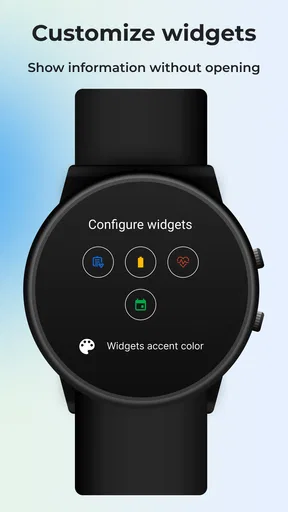
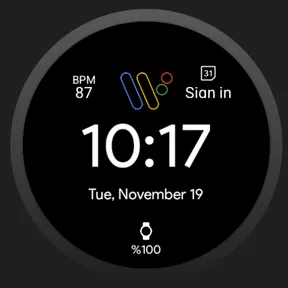
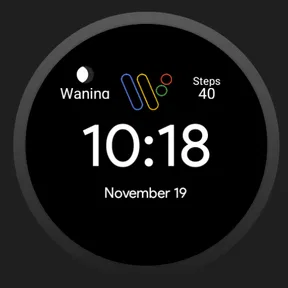
One of my favorite features is how customizable everything is. You can tweak colors, styles, and even the complications (those little bits of extra info like date or steps). It’s super intuitive, so you don’t need to be a tech wizard to make your watch face uniquely yours. I’ve spent countless hours mixing and matching colors to match my outfits, and it’s ridiculously fun!
Battery Friendly
Another major win for this app is its impact on battery life. Smartwatches are notorious for needing frequent charges, but the minimal designs mean less power consumption. I’ve noticed a significant improvement in battery life since switching to these faces, which is a huge plus in my book.
Seamless Integration
The app integrates smoothly with both Android and iOS systems. Whether you’re rocking a Samsung Gear or an Apple Watch, you’ll find that the transition is seamless. There’s no lag, no glitches, just straightforward functionality. It’s clear the developers have put a lot of thought into making this app user-friendly across all platforms.
A Few Tips to Get the Most Out of It
If you’re diving into Minimal Watch Faces, here are a few tips. First, explore all the color options before settling on one. You’d be surprised how much a slight hue change can enhance the overall look. Second, experiment with the complications. Even though it’s a minimalist app, the right mix of information can still be incredibly useful without feeling cluttered.
Lastly, don’t be afraid to switch it up regularly. With so many designs at your disposal, it’s easy to keep your smartwatch feeling fresh and new. It’s like having a wardrobe for your wrist!
Final Thoughts
In a world filled with endless notifications and constant connectivity, Minimal Watch Faces offers a refreshing escape. It’s all about focusing on what’s truly important and letting go of the excess. If you’re someone who values simplicity and style, I wholeheartedly recommend giving this app a try. It’s a small change that makes a big difference in how you experience your smartwatch.
Ready to transform your smartwatch into a stylish accessory? Check out the Minimal Watch Faces app today and step into the world of minimalist elegance.
Pros
- Elegant and minimalist design options.
- Highly customizable color schemes.
- Battery-efficient watch faces.
- Supports both analog and digital styles.
- Easy-to-use interface for setup.
Cons
- Limited free watch face options.
- Some features require in-app purchases.
- Occasional lag on older devices.
- No interactive complications support.
- Limited third-party app integrations.
FAQs for Minimal Watch Faces
What features do Minimal Watch Faces offer?
Minimal Watch Faces provide a variety of simple, sleek designs for your smartwatch. These watch faces focus on elegance and functionality, offering customizable options such as color schemes, date and time displays, and additional widgets like weather updates and battery level indicators. The goal is to enhance readability while maintaining a clean look.
Are the watch faces compatible with all smartwatches?
Minimal Watch Faces are designed to be compatible with a wide range of smartwatches, including popular models running on Android Wear OS and some iOS devices. However, it's essential to check the specific compatibility with your device model in the app store before downloading to ensure smooth functionality.
How customizable are the Minimal Watch Faces?
The watch faces are highly customizable, allowing users to adjust color palettes, font styles, and widget placements. This personalization ensures that you can tailor the watch face to match your personal style and preferences, while also prioritizing the information you find most useful on your smartwatch.
Does the app consume a lot of battery power?
Minimal Watch Faces are optimized to minimize battery consumption. The app uses efficient coding practices and low-power display techniques, such as minimizing animations and using darker colors, to help extend the battery life of your smartwatch without compromising on style or functionality.
Is there a cost associated with using Minimal Watch Faces?
While Minimal Watch Faces offer a selection of free designs, some premium options may require a one-time purchase or a subscription for additional features. The app provides a good balance between free and paid options, allowing users to enjoy a variety of styles without necessarily incurring extra costs.


